easygraphics.processing package
A Processing (http://processing.org) like animation graphics module
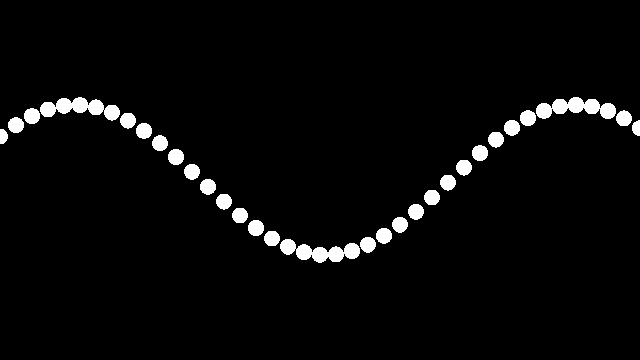
from easygraphics import *
from easygraphics.processing import *
import math

x_spacing = 16  # How far apart should each horizontal location be spaced
theta = 0  # Start angle at 0
amplitude = 75  # Height of wave
period = 500  # How many pixels before the wave repeats

dx = (2 * math.pi / period) * x_spacing

def setup():
    global w
    set_size(640, 360)
    translate(0, get_height() // 2)
    set_background_color("black")
    set_fill_color("white")
    w = get_width() + 16  # Width of entire wave

def draw():
    global theta
    theta += 0.02
    clear_device()
    x = theta
    for i in range(w // x_spacing):
        y = math.sin(x) * amplitude
        fill_circle(i * x_spacing, y, 8)
        x += dx

run_app(globals())
Function list
To be redefined(Override)
draw |
|
setup |
|
on_mouse_clicked |
|
on_mouse_dragged |
|
on_mouse_pressed |
|
on_mouse_released |
|
on_mouse_wheel |
Control and Settings
full_screen |
|
get_frame_rate |
|
loop |
|
mouse_pressed |
|
mouse_x |
|
mouse_y |
|
noloop |
|
prev_mouse_x |
|
prev_mouse_y |
|
redraw |
|
set_frame_rate |
|
set_size |
Functions
-
easygraphics.processing.redraw()¶ Call draw() to draw a frame once.
You must NOT redefine this function!
-
easygraphics.processing.loop()¶ Start looping.
-
easygraphics.processing.noloop()¶ Stop looping.
-
easygraphics.processing.run_app(_globals)¶ Run the processing app.
Parameters: _globals – the python globals dict.
-
easygraphics.processing.set_size(width: int, height: int)¶ Open a canvas window with the specified size.
Parameters: - width – width of the canvas
- height – height of the canvas
-
easygraphics.processing.full_screen()¶ Open a full screen canvas.
-
easygraphics.processing.draw()¶ Draw an animation frame.
You should redefine this function in your program.
Returns:
-
easygraphics.processing.setup()¶ Set up the processing context.
You should redefine this function in your program.
-
easygraphics.processing.set_frame_rate(fps: int)¶ Set the animation frame rate (fps).
Parameters: fps – the frame rate
-
easygraphics.processing.get_frame_rate() → int¶ Get the animation frame rate (fps).
Returns: the frame rate
-
easygraphics.processing.on_mouse_wheel(e: <sphinx.ext.autodoc.importer._MockObject object at 0x7f5087bda550>)¶ The mouse wheel event handler.
You can redefine this function to handle the mouse wheel event.
-
easygraphics.processing.on_mouse_dragged()¶ The mouse drag event handler.
You can redefine this function to handle the mouse drag event.
-
easygraphics.processing.on_mouse_released()¶ The mouse release event handler.
You can redefine this function to handle the mouse release event.
-
easygraphics.processing.on_mouse_pressed()¶ The mouse press event handler.
You can redefine this function to handle the mouse press event.
-
easygraphics.processing.on_mouse_clicked()¶ The mouse click event handler.
You can redefine this function to handle the mouse click event.
-
class
easygraphics.processing.ProcessingWidget(*args, auto_start=True, **kwargs)¶ The processing-like widget.
-
draw()¶ Draw an animation frame.
You should override this method.
-
full_screen()¶ Set the canvas size to full screen.
-
get_canvas() → easygraphics.image.Image¶ Get the canvas image.
Returns: the canvas image
-
get_frame_rate() → int¶ Get the animation frame rate (fps).
Returns: the frame rate
-
keyPressEvent(e: <sphinx.ext.autodoc.importer._MockObject object at 0x7f50785441d0>)
-
loop()¶ Start looping.
-
mouseMoveEvent(e: <sphinx.ext.autodoc.importer._MockObject object at 0x7f50785441d0>)
-
mousePressEvent(e: <sphinx.ext.autodoc.importer._MockObject object at 0x7f50785441d0>)
-
mouseReleaseEvent(e: <sphinx.ext.autodoc.importer._MockObject object at 0x7f50785441d0>)
-
noloop()¶ Stop looping.
-
on_mouse_clicked()¶ The mouse click event handler.
You can override it to handle the mouse click event.
-
on_mouse_dragged()¶ The mouse drag event handler.
You can override it to handle the mouse drag event.
-
on_mouse_pressed()¶ The mouse press event handler.
You can override it to handle the mouse press event.
-
on_mouse_released()¶ The mouse release event handler.
You can override it to handle the mouse release event.
-
on_mouse_wheel(e: <sphinx.ext.autodoc.importer._MockObject object at 0x7f50785441d0>)¶ The mouse wheel event handler.
You can override it to handle the mouse wheel event.
-
paintEvent(e: <sphinx.ext.autodoc.importer._MockObject object at 0x7f50785441d0>)
-
redraw()¶ Call draw() to draw a frame once.
-
set_frame_rate(fps)¶ Set the animation frame rate (fps).
Parameters: fps – the frame rate
-
set_size(width: int, height: int)¶ Set the canvas size.
Parameters: - width – width of the canvas.
- height – height of the canvas.
-
setup()¶ Setup the drawing context.
You should override this method.
-
start()¶ Start the animation manually.
-
wheelEvent(e: <sphinx.ext.autodoc.importer._MockObject object at 0x7f50785441d0>)
-